Originally published at: GeekMagi Mini-TV mit ESPHome nutzen
Im Bereich der Smart-Home-Bastler erfreuen sich kostengünstige IoT-Geräte großer Beliebtheit, insbesondere wenn sie sich zweckentfremden und in lokale Systeme wie Home Assistant integrieren lassen. Ein aktuelles Beispiel hierfür ist das oft unter der Bezeichnung „GeekMagic Ultra Smart WiFi Weather Forecast Station„² vertriebene Mini-Display. Während derartige Geräte üblicherweise physische Eingriffe erfordern, um eine alternative Firmware aufzuspielen,…
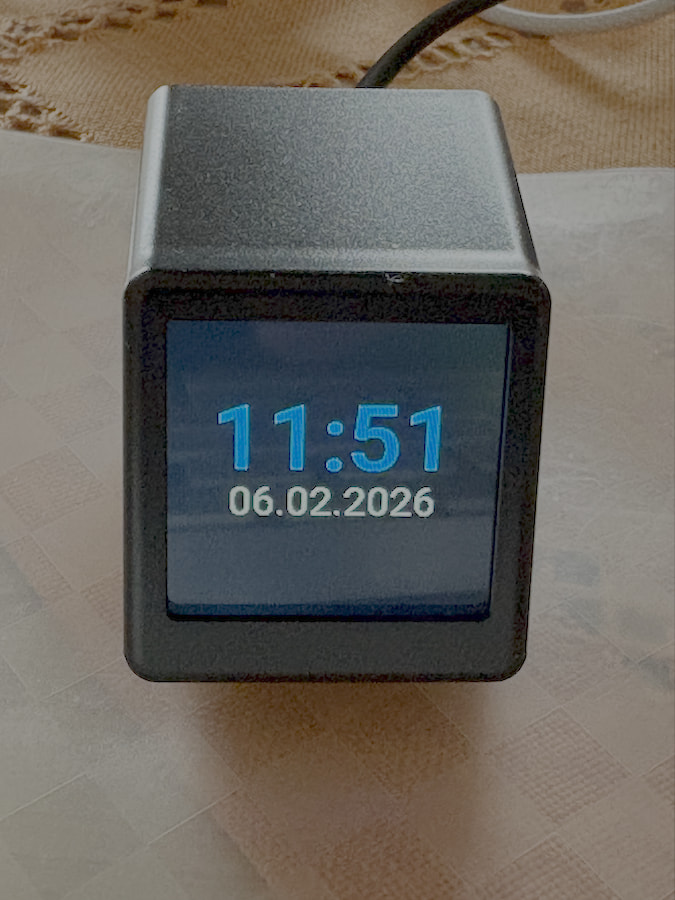
Hier noch ein wenig YAML-Code samt dazugehöriger Fotos vom Screen des Mini-TV um ein grobes Gefühl zu geben, was damit möglich ist:
Kategorie “Hallo Welt”:
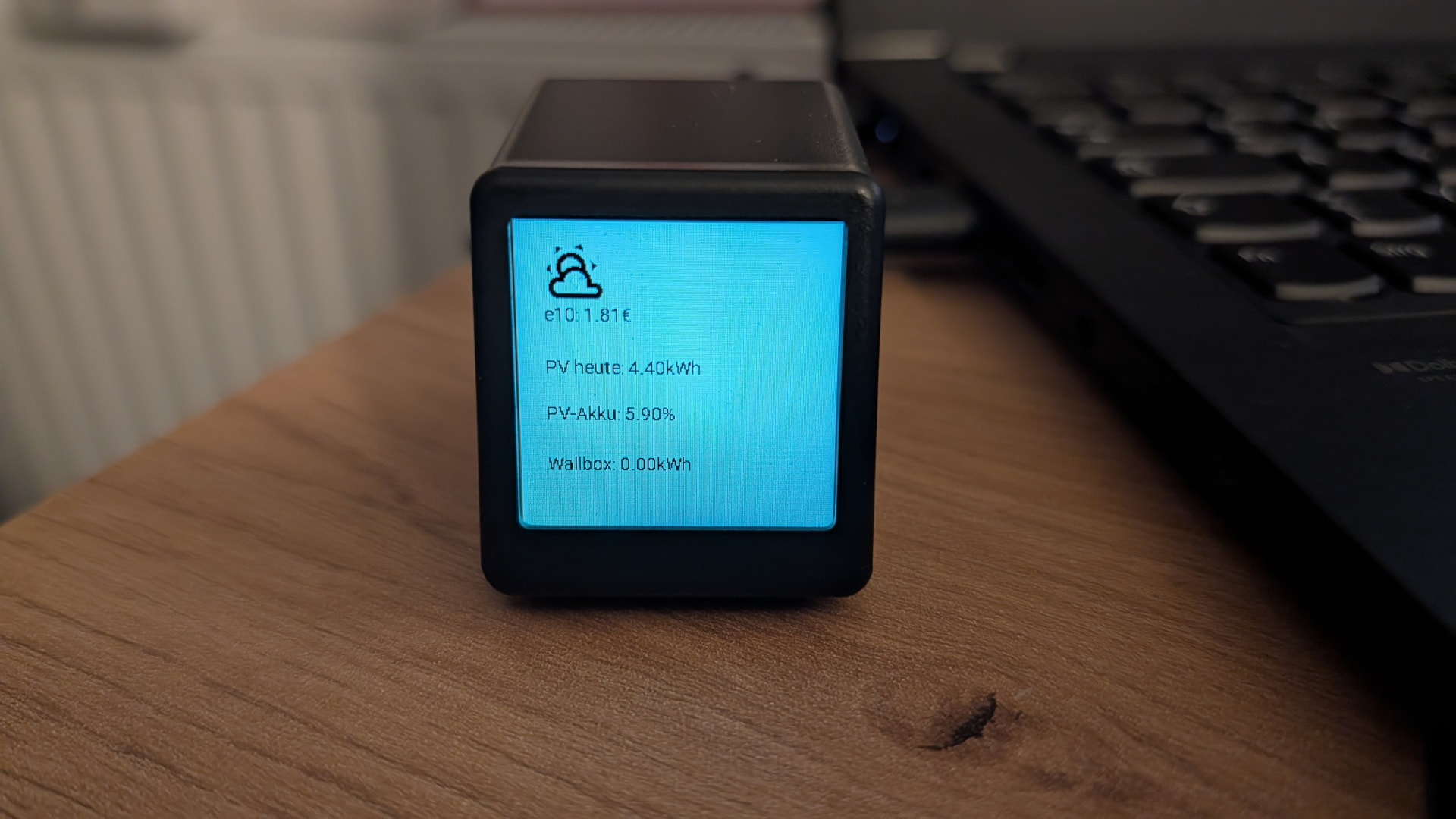
Dazugehöriger YAML-Code:
esphome:
  name: geekmagic
  friendly_name: Mini Display TV

esp8266:
  board: d1_mini

logger:

api:

ota:
  - platform: esphome

wifi:
  ssid: !secret wifi_ssid
  password: !secret wifi_password

spi:
  clk_pin: GPIO14
  mosi_pin: GPIO13
  interface: hardware
  id: spihwd

output:
  - platform: esp8266_pwm
    pin: GPIO05
    frequency: 200 Hz
    inverted: true
    id: backlight_pwm

light:
  - platform: monochromatic
    output: backlight_pwm
    name: "Backlight"
    id: backlight
    restore_mode: RESTORE_AND_ON

display:
  - platform: mipi_spi
    model: st7789v
    spi_id: spihwd
    dimensions:
      height: 240
      width: 240
      offset_height: 0
      offset_width: 0
    invert_colors: true
    dc_pin: GPIO00
    reset_pin: GPIO02
    color_depth: 8
    update_interval: 30s
    id: my_display
    spi_mode: mode3
    lambda: |-
      const auto COLOR_WHITE = Color(255, 255, 255);
      const auto COLOR_BLACK = Color(0, 0, 0);
      const auto COLOR_RED = Color(255, 0, 0);
      const auto COLOR_GREEN = Color(0, 255, 0);
      const auto COLOR_BLUE = Color(0, 0, 255);
      const auto COLOR_YELLOW = Color(255, 255, 0);
      const auto COLOR_ORANGE = Color(255, 165, 0);
      auto color_off = COLOR_WHITE;
      auto color_on = COLOR_BLACK;

      auto extract_time = [](const char* iso_str) -> std::string {
          // Expected format: YYYY-MM-DDTHH:MM:SS or similar
          std::string s(iso_str);
          if (s.length() >= 16) return s.substr(11, 5);
          return "";
      };

      int currentPage = id(display_page);
      if (currentPage == 0) {
        // page:name "Page 1"
        // page:dark_mode "inherit"
        // page:refresh_type "interval"
        // page:refresh_time ""
        // Clear screen for this page
        it.fill(COLOR_WHITE);
        color_off = COLOR_WHITE;
        color_on = COLOR_BLACK;
        // widget:icon id:w_mk6jjdyeqo869 type:icon x:119 y:21 w:38 h:40 code:F0004 size:30 color:black
        it.printf(119, 21, id(font_material_design_icons_400_30), COLOR_BLACK, "%s", "\U000F0004");
        // widget:sensor_text id:w_mk6jll265mlip type:sensor_text x:159 y:25 w:58 h:32 ent:sensor.smarterkram_abonnenten entity_2: title:"smarterkram | Olli Abonnenten" format:value_only_no_unit label_font:14 value_font:20 color:#FF0000 label_align:TOP_LEFT value_align:TOP_LEFT precision:0 unit:"" hide_unit:true prefix:"" postfix:"" separator:" ~ " local:false text_sensor:false font_family:"Roboto" font_weight:400 italic:false
        {
          char buf1[32];
          snprintf(buf1, sizeof(buf1), "%.0f", id(sensor_smarterkram_abonnenten).state);
          std::string val1 = buf1;
          std::string sensorValue = val1;
          std::string fullValue = "" + sensorValue + "" + "";
          it.printf(159, 25, id(font_roboto_400_20), Color(255, 0, 0), TextAlign::TOP_LEFT, "%s", fullValue.c_str());
        }
        // widget:image id:w_mk6jo9fifyopn type:image x:20 y:120 w:200 h:100 path:"1.png" url:"" invert:false render_mode:"Auto"
        it.image(20, 120, id(img_1_png_200x100));
        // widget:weather_icon id:w_mk6mnffil5uxf type:weather_icon x:20 y:13 w:48 h:48 entity:weather.forecast_home size:48 color:black
        {
          std::string weather_state = id(weather_forecast_home).state;
          const char* icon = "\U000F0599"; // Default: sunny
          if (weather_state == "clear-night") icon = "\U000F0594";
          else if (weather_state == "cloudy") icon = "\U000F0590";
          else if (weather_state == "exceptional") icon = "\U000F0026";
          else if (weather_state == "fog") icon = "\U000F0591";
          else if (weather_state == "hail") icon = "\U000F0592";
          else if (weather_state == "lightning") icon = "\U000F0593";
          else if (weather_state == "lightning-rainy") icon = "\U000F067E";
          else if (weather_state == "partlycloudy") icon = "\U000F0595";
          else if (weather_state == "pouring") icon = "\U000F0596";
          else if (weather_state == "rainy") icon = "\U000F0597";
          else if (weather_state == "snowy") icon = "\U000F0598";
          else if (weather_state == "snowy-rainy") icon = "\U000F067F";
          else if (weather_state == "sunny") icon = "\U000F0599";
          else if (weather_state == "windy") icon = "\U000F059D";
          else if (weather_state == "windy-variant") icon = "\U000F059E";
          it.printf(20, 13, id(font_material_design_icons_400_48), COLOR_BLACK, "%s", icon);
        }
        // widget:sensor_text id:w_mk6n14vxlp5v5 type:sensor_text x:20 y:80 w:120 h:40 ent:sensor.tankerkoenig_jaeger_overath_e10 entity_2: title:"e10" format:label_value label_font:14 value_font:20 color:black label_align:TOP_LEFT value_align:TOP_LEFT precision:2 unit:"" hide_unit:false prefix:"" postfix:"" separator:" ~ " local:false text_sensor:false font_family:"Roboto" font_weight:400 italic:false
        {
          char buf1[32];
          snprintf(buf1, sizeof(buf1), "%.2f", id(sensor_tankerkoenig_jaeger_overath_e10).state);
          std::string val1 = buf1;
          std::string sensorValue = val1;
          std::string fullValue = "" + sensorValue + "€" + "";
          // label_value format: label and value on same line
          it.printf(20, 80, id(font_roboto_400_14), COLOR_BLACK, TextAlign::TOP_LEFT, "e10: %s", fullValue.c_str());
        }
      }


# ====================================
# Device Settings
# ====================================
# Orientation: landscape
# Dark Mode: disabled
# Refresh Interval: 600
# Power Strategy: Full Power (Always On)
# ====================================

globals:
  - id: display_page
    type: int
    restore_value: true
    initial_value: '0'
  - id: page_refresh_default_s
    type: int
    restore_value: true
    initial_value: '600'
  - id: page_refresh_current_s
    type: int
    restore_value: false
    initial_value: '60'
  - id: last_page_switch_time
    type: uint32_t
    restore_value: false
    initial_value: '0'

http_request:
  verify_ssl: false
  timeout: 20s

time:
  - platform: homeassistant
    id: ha_time

sensor:
  - platform: homeassistant
    id: sensor_smarterkram_abonnenten
    entity_id: sensor.smarterkram_abonnenten
    internal: true
  - platform: homeassistant
    id: sensor_tankerkoenig_jaeger_overath_e10
    entity_id: sensor.tankerkoenig_jaeger_overath_e10
    internal: true

button:
  - platform: template
    name: "Next Page"
    on_press:
      then:
        - script.execute:
            id: change_page_to
            target_page: !lambda 'return id(display_page) + 1;'
  - platform: template
    name: "Previous Page"
    on_press:
      then:
        - script.execute:
            id: change_page_to
            target_page: !lambda 'return id(display_page) - 1;'
  - platform: template
    name: "Refresh Display"
    on_press:
      then:
        - component.update: my_display
  - platform: template
    name: "Go to Page 1"
    on_press:
      then:
        - script.execute:
            id: change_page_to
            target_page: 0

image:
  - file: "1.png"
    id: img_1_png_200x100
    resize: 200x100
    type: BINARY
    dither: FLOYDSTEINBERG

text_sensor:
  # Weather Entity Sensors
  - platform: homeassistant
    id: weather_forecast_home
    entity_id: weather.forecast_home
    internal: true


font:
  - file:
      type: gfonts
      family: Roboto
      weight: 400
    id: font_roboto_400_20
    size: 20
    glyphs: ["\U00000020", "\U00000021", "\U00000022", "\U00000023", "\U00000024", "\U00000025", "\U00000026", "\U00000027", "\U00000028", "\U00000029", "\U0000002a", "\U0000002b", "\U0000002c", "\U0000002d", "\U0000002e", "\U0000002f", "\U00000030", "\U00000031", "\U00000032", "\U00000033", "\U00000034", "\U00000035", "\U00000036", "\U00000037", "\U00000038", "\U00000039", "\U0000003a", "\U0000003b", "\U0000003c", "\U0000003d", "\U0000003e", "\U0000003f", "\U00000040", "\U00000041", "\U00000042", "\U00000043", "\U00000044", "\U00000045", "\U00000046", "\U00000047", "\U00000048", "\U00000049", "\U0000004a", "\U0000004b", "\U0000004c", "\U0000004d", "\U0000004e", "\U0000004f", "\U00000050", "\U00000051", "\U00000052", "\U00000053", "\U00000054", "\U00000055", "\U00000056", "\U00000057", "\U00000058", "\U00000059", "\U0000005a", "\U0000005b", "\U0000005c", "\U0000005d", "\U0000005e", "\U0000005f", "\U00000060", "\U00000061", "\U00000062", "\U00000063", "\U00000064", "\U00000065", "\U00000066", "\U00000067", "\U00000068", "\U00000069", "\U0000006a", "\U0000006b", "\U0000006c", "\U0000006d", "\U0000006e", "\U0000006f", "\U00000070", "\U00000071", "\U00000072", "\U00000073", "\U00000074", "\U00000075", "\U00000076", "\U00000077", "\U00000078", "\U00000079", "\U0000007a", "\U0000007b", "\U0000007c", "\U0000007d", "\U0000007e", "\U000000B0", "\U000000B1", "\U000000B2", "\U000000B3", "\U000000B5", "\U000000A3", "\U000000A5", "\U000000A9", "\U000000AE", "\U000000D7", "\U000000F7", "\U000003BC", "\U000003A9", "\U000020AC", "\U00002122"]
  - file: "fonts/materialdesignicons-webfont.ttf"
    id: font_material_design_icons_400_30
    size: 30
    glyphs: ["\U000F0004"]
  - file:
      type: gfonts
      family: Roboto
      weight: 400
    id: font_roboto_400_14
    size: 14
    glyphs: ["\U00000020", "\U00000021", "\U00000022", "\U00000023", "\U00000024", "\U00000025", "\U00000026", "\U00000027", "\U00000028", "\U00000029", "\U0000002a", "\U0000002b", "\U0000002c", "\U0000002d", "\U0000002e", "\U0000002f", "\U00000030", "\U00000031", "\U00000032", "\U00000033", "\U00000034", "\U00000035", "\U00000036", "\U00000037", "\U00000038", "\U00000039", "\U0000003a", "\U0000003b", "\U0000003c", "\U0000003d", "\U0000003e", "\U0000003f", "\U00000040", "\U00000041", "\U00000042", "\U00000043", "\U00000044", "\U00000045", "\U00000046", "\U00000047", "\U00000048", "\U00000049", "\U0000004a", "\U0000004b", "\U0000004c", "\U0000004d", "\U0000004e", "\U0000004f", "\U00000050", "\U00000051", "\U00000052", "\U00000053", "\U00000054", "\U00000055", "\U00000056", "\U00000057", "\U00000058", "\U00000059", "\U0000005a", "\U0000005b", "\U0000005c", "\U0000005d", "\U0000005e", "\U0000005f", "\U00000060", "\U00000061", "\U00000062", "\U00000063", "\U00000064", "\U00000065", "\U00000066", "\U00000067", "\U00000068", "\U00000069", "\U0000006a", "\U0000006b", "\U0000006c", "\U0000006d", "\U0000006e", "\U0000006f", "\U00000070", "\U00000071", "\U00000072", "\U00000073", "\U00000074", "\U00000075", "\U00000076", "\U00000077", "\U00000078", "\U00000079", "\U0000007a", "\U0000007b", "\U0000007c", "\U0000007d", "\U0000007e", "\U000000B0", "\U000000B1", "\U000000B2", "\U000000B3", "\U000000B5", "\U000000A3", "\U000000A5", "\U000000A9", "\U000000AE", "\U000000D7", "\U000000F7", "\U000003BC", "\U000003A9", "\U000020AC", "\U00002122"]
  - file: "fonts/materialdesignicons-webfont.ttf"
    id: font_material_design_icons_400_48
    size: 48
    glyphs: ["\U000F0026", "\U000F0590", "\U000F0591", "\U000F0592", "\U000F0593", "\U000F0594", "\U000F0595", "\U000F0596", "\U000F0597", "\U000F0598", "\U000F0599", "\U000F059D", "\U000F059E", "\U000F067E", "\U000F067F"]
script:
  - id: change_page_to
    parameters:
      target_page: int
    then:
      - lambda: |-
          int pages_count = 1;
          int target = target_page;
          while (target < 0) target += pages_count;
          target %= pages_count;

          if (id(display_page) != target) {
            id(display_page) = target;
            id(last_page_switch_time) = millis();
            id(my_display).update();
            ESP_LOGI("display", "Switched to page %d", target);
            // Restart refresh logic
            if (id(manage_run_and_sleep).is_running()) id(manage_run_and_sleep).stop();
            id(manage_run_and_sleep).execute();
          }
  - id: manage_run_and_sleep
    mode: restart
    then:
      - logger.log: "Waiting for sync..."
      - wait_until:
          condition:
            lambda: 'return id(ha_time).now().is_valid() && api_is_connected();'
          timeout: 60s
      - delay: 5s
      - lambda: 'id(page_refresh_current_s) = id(page_refresh_default_s);'
      - component.update: my_display
      - delay: !lambda 'return id(page_refresh_current_s) * 1000;'
      - script.execute: manage_run_and_sleep
Oder hier mein aktueller Info-Screen:
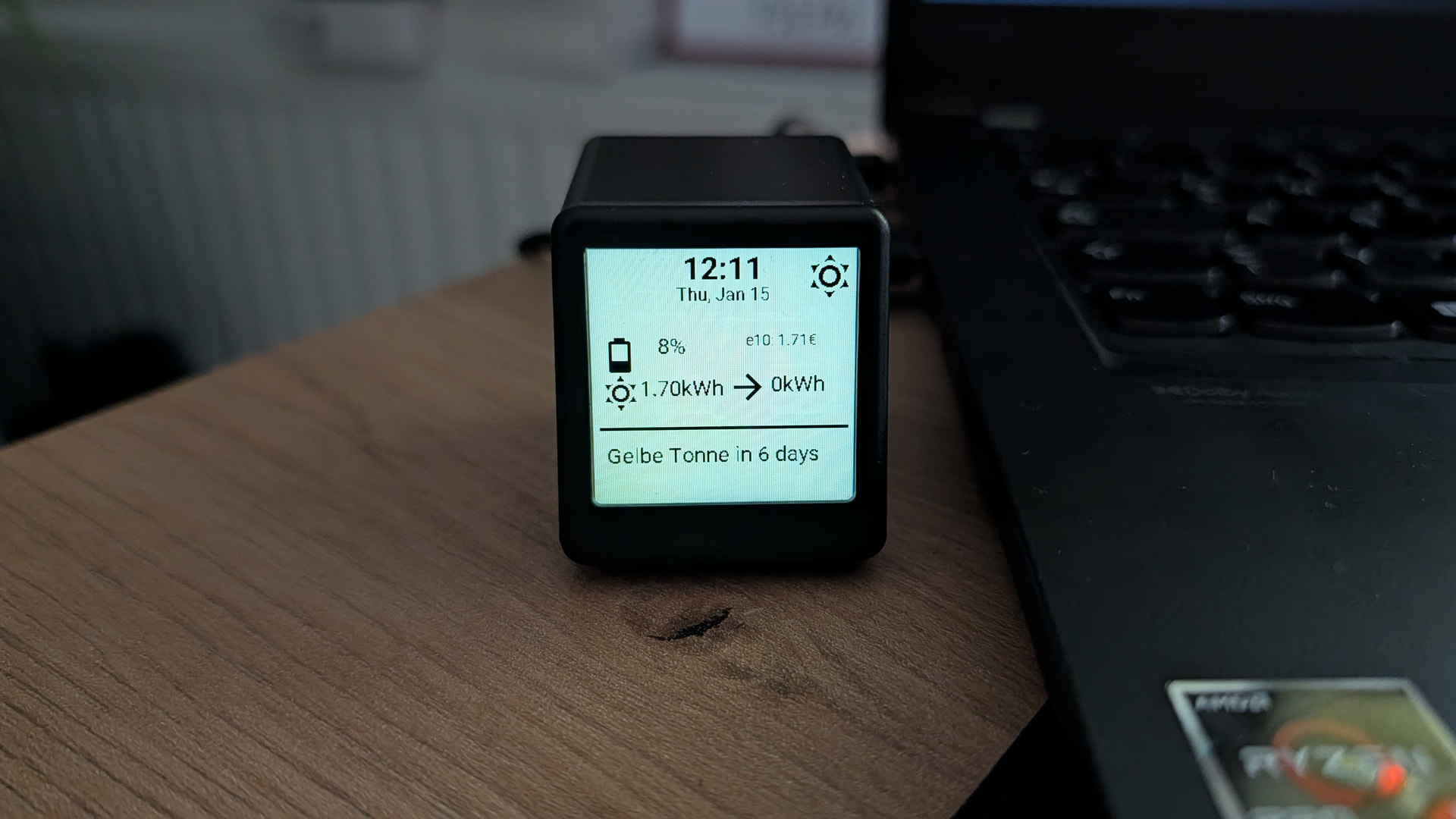
esphome:
  name: geekmagic
  friendly_name: Mini Display TV

esp8266:
  board: d1_mini

logger:

api:

ota:
  - platform: esphome

wifi:
  ssid: !secret wifi_ssid
  password: !secret wifi_password

spi:
  clk_pin: GPIO14
  mosi_pin: GPIO13
  interface: hardware
  id: spihwd

output:
  - platform: esp8266_pwm
    pin: GPIO05
    frequency: 200 Hz
    inverted: true
    id: backlight_pwm

light:
  - platform: monochromatic
    output: backlight_pwm
    name: "Backlight"
    id: backlight
    restore_mode: RESTORE_AND_ON

display:
  - platform: mipi_spi
    model: st7789v
    spi_id: spihwd
    dimensions:
      height: 240
      width: 240
      offset_height: 0
      offset_width: 0
    invert_colors: true
    dc_pin: GPIO00
    reset_pin: GPIO02
    color_depth: 8
    #update_interval: never
    update_interval: 30s
    id: my_display
    spi_mode: mode3
    lambda: |-
      const auto COLOR_WHITE = Color(255, 255, 255);
      const auto COLOR_BLACK = Color(0, 0, 0);
      const auto COLOR_RED = Color(255, 0, 0);
      const auto COLOR_GREEN = Color(0, 255, 0);
      const auto COLOR_BLUE = Color(0, 0, 255);
      const auto COLOR_YELLOW = Color(255, 255, 0);
      const auto COLOR_ORANGE = Color(255, 165, 0);
      auto color_off = COLOR_WHITE;
      auto color_on = COLOR_BLACK;

      auto extract_time = [](const char* iso_str) -> std::string {
          // Expected format: YYYY-MM-DDTHH:MM:SS or similar
          std::string s(iso_str);
          if (s.length() >= 16) return s.substr(11, 5);
          return "";
      };

      int currentPage = id(display_page);
      if (currentPage == 0) {
        // page:name "Page 1"
        // page:dark_mode "inherit"
        // page:refresh_type "interval"
        // page:refresh_time ""
        // Clear screen for this page
        it.fill(COLOR_WHITE);
        color_off = COLOR_WHITE;
        color_on = COLOR_BLACK;
        // widget:weather_icon id:w_mk6mnffil5uxf type:weather_icon x:192 y:1 w:48 h:48 entity:weather.forecast_home size:48 color:black
        {
          std::string weather_state = id(weather_forecast_home).state;
          const char* icon = "\U000F0599"; // Default: sunny
          if (weather_state == "clear-night") icon = "\U000F0594";
          else if (weather_state == "cloudy") icon = "\U000F0590";
          else if (weather_state == "exceptional") icon = "\U000F0026";
          else if (weather_state == "fog") icon = "\U000F0591";
          else if (weather_state == "hail") icon = "\U000F0592";
          else if (weather_state == "lightning") icon = "\U000F0593";
          else if (weather_state == "lightning-rainy") icon = "\U000F067E";
          else if (weather_state == "partlycloudy") icon = "\U000F0595";
          else if (weather_state == "pouring") icon = "\U000F0596";
          else if (weather_state == "rainy") icon = "\U000F0597";
          else if (weather_state == "snowy") icon = "\U000F0598";
          else if (weather_state == "snowy-rainy") icon = "\U000F067F";
          else if (weather_state == "sunny") icon = "\U000F0599";
          else if (weather_state == "windy") icon = "\U000F059D";
          else if (weather_state == "windy-variant") icon = "\U000F059E";
          it.printf(192, 1, id(font_material_design_icons_400_48), COLOR_BLACK, "%s", icon);
        }
        // widget:sensor_text id:w_mk6n14vxlp5v5 type:sensor_text x:140 y:74 w:95 h:40 ent:sensor.tankerkoenig_jaeger_overath_e10 entity_2: title:"e10" format:label_value label_font:14 value_font:20 color:black label_align:TOP_LEFT value_align:TOP_LEFT precision:2 unit:"" hide_unit:false prefix:"" postfix:"" separator:"~" local:false text_sensor:false font_family:"Roboto" font_weight:400 italic:false
        {
          char buf1[32];
          snprintf(buf1, sizeof(buf1), "%.2f", id(sensor_tankerkoenig_jaeger_overath_e10).state);
          std::string val1 = buf1;
          std::string sensorValue = val1;
          std::string fullValue = "" + sensorValue + "€" + "";
          // label_value format: label and value on same line
          it.printf(140, 74, id(font_roboto_400_14), COLOR_BLACK, TextAlign::TOP_LEFT, "e10: %s", fullValue.c_str());
        }
        // widget:sensor_text id:w_1768461104907_858_24 type:sensor_text x:43 y:114 w:105 h:31 ent:sensor.solcast_pv_forecast_prognose_verbleibende_leistung_heute entity_2: title:"" format:label_value label_font:14 value_font:20 color:black label_align:TOP_LEFT value_align:TOP_LEFT precision:2 unit:"" hide_unit:false prefix:"" postfix:"" separator:"~" local:false text_sensor:false font_family:"Roboto" font_weight:400 italic:false
        {
          char buf1[32];
          snprintf(buf1, sizeof(buf1), "%.2f", id(sensor_solcast_pv_forecast_prognose_verbleibende_leistung_heute).state);
          std::string val1 = buf1;
          std::string sensorValue = val1;
          std::string fullValue = "" + sensorValue + "kWh" + "";
          it.printf(43, 114, id(font_roboto_400_20), COLOR_BLACK, TextAlign::TOP_LEFT, "%s", fullValue.c_str());
        }
        // widget:sensor_text id:w_1768461184624_269_44 type:sensor_text x:60 y:75 w:60 h:31 ent:sensor.rct_power_storage_mxwp_battery_state_of_charge entity_2: title:"" format:label_value label_font:14 value_font:20 color:black label_align:TOP_LEFT value_align:TOP_LEFT precision:0 unit:"" hide_unit:false prefix:"" postfix:"" separator:"~" local:false text_sensor:false font_family:"Roboto" font_weight:400 italic:false
        {
          char buf1[32];
          snprintf(buf1, sizeof(buf1), "%.0f", id(sensor_rct_power_storage_mxwp_battery_state_of_charge).state);
          std::string val1 = buf1;
          std::string sensorValue = val1;
          std::string fullValue = "" + sensorValue + "%" + "";
          it.printf(60, 75, id(font_roboto_400_20), COLOR_BLACK, TextAlign::TOP_LEFT, "%s", fullValue.c_str());
        }
        // widget:sensor_text id:w_1768461217495_99_32 type:sensor_text x:163 y:111 w:77 h:31 ent:sensor.evcc_alfen_wb_charged_energy entity_2: title:"" format:label_value label_font:14 value_font:20 color:black label_align:TOP_LEFT value_align:TOP_LEFT precision:0 unit:"" hide_unit:false prefix:"" postfix:"" separator:"~" local:false text_sensor:false font_family:"Roboto" font_weight:400 italic:false
        {
          char buf1[32];
          snprintf(buf1, sizeof(buf1), "%.0f", id(sensor_evcc_alfen_wb_charged_energy).state);
          std::string val1 = buf1;
          std::string sensorValue = val1;
          std::string fullValue = "" + sensorValue + "kWh" + "";
          it.printf(163, 111, id(font_roboto_400_20), COLOR_BLACK, TextAlign::TOP_LEFT, "%s", fullValue.c_str());
        }
        // widget:datetime id:w_mkf6yo0dnkqhj type:datetime x:20 y:1 w:200 h:60 format:time_date time_size:28 date_size:16 color:black text_align:CENTER italic:false font_family:"Roboto"
        {
          auto now = id(ha_time).now();
          it.strftime(20 + 200/2, 1, id(font_roboto_700_28), COLOR_BLACK, TextAlign::TOP_CENTER, "%H:%M", now);
          it.strftime(20 + 200/2, 1 + 28 + 2, id(font_roboto_400_16), COLOR_BLACK, TextAlign::TOP_CENTER, "%a, %b %d", now);
        }
        // widget:icon id:w_mkf728ihvx1gu type:icon x:6 y:75 w:30 h:30 code:F007C size:40 color:black
        it.printf(6, 75, id(font_material_design_icons_400_40), COLOR_BLACK, "%s", "\U000F007C");
        // widget:icon id:w_mkf752vmi7ltf type:icon x:6 y:110 w:30 h:30 code:F0599 size:40 color:black
        it.printf(6, 110, id(font_material_design_icons_400_40), COLOR_BLACK, "%s", "\U000F0599");
        // widget:line id:w_mkf77yundn5go type:line x:6 y:162 w:229 h:3 stroke:3 color:black orientation:horizontal
        it.filled_rectangle(6, 162, 229, 3, COLOR_BLACK);
        // widget:icon id:w_mkf78pm6ygm23 type:icon x:122 y:105 w:30 h:30 code:F0054 size:40 color:black
        it.printf(122, 105, id(font_material_design_icons_400_40), COLOR_BLACK, "%s", "\U000F0054");
        // widget:sensor_text id:w_mkfaa43229ilx type:sensor_text x:12 y:177 w:219 h:57 ent:sensor.muell entity_2: title:"" format:label_value label_font:14 value_font:20 color:black label_align:TOP_LEFT value_align:TOP_LEFT precision:2 unit:"" hide_unit:false prefix:"" postfix:"" separator:" ~ " local:false text_sensor:true font_family:"Roboto" font_weight:400 italic:false
        {
          std::string val1 = id(sensor_muell_txt).state;
          std::string sensorValue = val1;
          std::string fullValue = "" + sensorValue + "" + "";
          it.printf(12, 177, id(font_roboto_400_20), COLOR_BLACK, TextAlign::TOP_LEFT, "%s", fullValue.c_str());
        }
      }


# ====================================
# Device Settings
# ====================================
# Orientation: landscape
# Dark Mode: disabled
# Refresh Interval: 600
# Power Strategy: Full Power (Always On)
# ====================================

globals:
  - id: display_page
    type: int
    restore_value: true
    initial_value: '0'
  - id: page_refresh_default_s
    type: int
    restore_value: true
    initial_value: '600'
  - id: page_refresh_current_s
    type: int
    restore_value: false
    initial_value: '60'
  - id: last_page_switch_time
    type: uint32_t
    restore_value: false
    initial_value: '0'

http_request:
  verify_ssl: false
  timeout: 20s

time:
  - platform: homeassistant
    id: ha_time

sensor:
  - platform: homeassistant
    id: sensor_tankerkoenig_jaeger_overath_e10
    entity_id: sensor.tankerkoenig_jaeger_overath_e10
    internal: true
  - platform: homeassistant
    id: sensor_solcast_pv_forecast_prognose_verbleibende_leistung_heute
    entity_id: sensor.solcast_pv_forecast_prognose_verbleibende_leistung_heute
    internal: true
  - platform: homeassistant
    id: sensor_rct_power_storage_mxwp_battery_state_of_charge
    entity_id: sensor.rct_power_storage_mxwp_battery_state_of_charge
    internal: true
  - platform: homeassistant
    id: sensor_evcc_alfen_wb_charged_energy
    entity_id: sensor.evcc_alfen_wb_charged_energy
    internal: true

button:
  - platform: template
    name: "Next Page"
    on_press:
      then:
        - script.execute:
            id: change_page_to
            target_page: !lambda 'return id(display_page) + 1;'
  - platform: template
    name: "Previous Page"
    on_press:
      then:
        - script.execute:
            id: change_page_to
            target_page: !lambda 'return id(display_page) - 1;'
  - platform: template
    name: "Refresh Display"
    on_press:
      then:
        - component.update: my_display
  - platform: template
    name: "Go to Page 1"
    on_press:
      then:
        - script.execute:
            id: change_page_to
            target_page: 0

text_sensor:
  # Home Assistant Text Sensors
  - platform: homeassistant
    id: sensor_muell_txt
    entity_id: sensor.muell
    internal: true

  # Weather Entity Sensors
  - platform: homeassistant
    id: weather_forecast_home
    entity_id: weather.forecast_home
    internal: true


font:
  - file:
      type: gfonts
      family: Roboto
      weight: 400
    id: font_roboto_400_20
    size: 20
    glyphs: ["\U00000020", "\U00000021", "\U00000022", "\U00000023", "\U00000024", "\U00000025", "\U00000026", "\U00000027", "\U00000028", "\U00000029", "\U0000002a", "\U0000002b", "\U0000002c", "\U0000002d", "\U0000002e", "\U0000002f", "\U00000030", "\U00000031", "\U00000032", "\U00000033", "\U00000034", "\U00000035", "\U00000036", "\U00000037", "\U00000038", "\U00000039", "\U0000003a", "\U0000003b", "\U0000003c", "\U0000003d", "\U0000003e", "\U0000003f", "\U00000040", "\U00000041", "\U00000042", "\U00000043", "\U00000044", "\U00000045", "\U00000046", "\U00000047", "\U00000048", "\U00000049", "\U0000004a", "\U0000004b", "\U0000004c", "\U0000004d", "\U0000004e", "\U0000004f", "\U00000050", "\U00000051", "\U00000052", "\U00000053", "\U00000054", "\U00000055", "\U00000056", "\U00000057", "\U00000058", "\U00000059", "\U0000005a", "\U0000005b", "\U0000005c", "\U0000005d", "\U0000005e", "\U0000005f", "\U00000060", "\U00000061", "\U00000062", "\U00000063", "\U00000064", "\U00000065", "\U00000066", "\U00000067", "\U00000068", "\U00000069", "\U0000006a", "\U0000006b", "\U0000006c", "\U0000006d", "\U0000006e", "\U0000006f", "\U00000070", "\U00000071", "\U00000072", "\U00000073", "\U00000074", "\U00000075", "\U00000076", "\U00000077", "\U00000078", "\U00000079", "\U0000007a", "\U0000007b", "\U0000007c", "\U0000007d", "\U0000007e", "\U000000B0", "\U000000B1", "\U000000B2", "\U000000B3", "\U000000B5", "\U000000A3", "\U000000A5", "\U000000A9", "\U000000AE", "\U000000D7", "\U000000F7", "\U000003BC", "\U000003A9", "\U000020AC", "\U00002122"]
  - file: "fonts/materialdesignicons-webfont.ttf"
    id: font_material_design_icons_400_48
    size: 48
    glyphs: ["\U000F0026", "\U000F0590", "\U000F0591", "\U000F0592", "\U000F0593", "\U000F0594", "\U000F0595", "\U000F0596", "\U000F0597", "\U000F0598", "\U000F0599", "\U000F059D", "\U000F059E", "\U000F067E", "\U000F067F"]
  - file:
      type: gfonts
      family: Roboto
      weight: 400
    id: font_roboto_400_14
    size: 14
    glyphs: ["\U00000020", "\U00000021", "\U00000022", "\U00000023", "\U00000024", "\U00000025", "\U00000026", "\U00000027", "\U00000028", "\U00000029", "\U0000002a", "\U0000002b", "\U0000002c", "\U0000002d", "\U0000002e", "\U0000002f", "\U00000030", "\U00000031", "\U00000032", "\U00000033", "\U00000034", "\U00000035", "\U00000036", "\U00000037", "\U00000038", "\U00000039", "\U0000003a", "\U0000003b", "\U0000003c", "\U0000003d", "\U0000003e", "\U0000003f", "\U00000040", "\U00000041", "\U00000042", "\U00000043", "\U00000044", "\U00000045", "\U00000046", "\U00000047", "\U00000048", "\U00000049", "\U0000004a", "\U0000004b", "\U0000004c", "\U0000004d", "\U0000004e", "\U0000004f", "\U00000050", "\U00000051", "\U00000052", "\U00000053", "\U00000054", "\U00000055", "\U00000056", "\U00000057", "\U00000058", "\U00000059", "\U0000005a", "\U0000005b", "\U0000005c", "\U0000005d", "\U0000005e", "\U0000005f", "\U00000060", "\U00000061", "\U00000062", "\U00000063", "\U00000064", "\U00000065", "\U00000066", "\U00000067", "\U00000068", "\U00000069", "\U0000006a", "\U0000006b", "\U0000006c", "\U0000006d", "\U0000006e", "\U0000006f", "\U00000070", "\U00000071", "\U00000072", "\U00000073", "\U00000074", "\U00000075", "\U00000076", "\U00000077", "\U00000078", "\U00000079", "\U0000007a", "\U0000007b", "\U0000007c", "\U0000007d", "\U0000007e", "\U000000B0", "\U000000B1", "\U000000B2", "\U000000B3", "\U000000B5", "\U000000A3", "\U000000A5", "\U000000A9", "\U000000AE", "\U000000D7", "\U000000F7", "\U000003BC", "\U000003A9", "\U000020AC", "\U00002122"]
  - file:
      type: gfonts
      family: Roboto
      weight: 700
    id: font_roboto_700_28
    size: 28
    glyphs: ["\U00000020", "\U00000021", "\U00000022", "\U00000023", "\U00000024", "\U00000025", "\U00000026", "\U00000027", "\U00000028", "\U00000029", "\U0000002a", "\U0000002b", "\U0000002c", "\U0000002d", "\U0000002e", "\U0000002f", "\U00000030", "\U00000031", "\U00000032", "\U00000033", "\U00000034", "\U00000035", "\U00000036", "\U00000037", "\U00000038", "\U00000039", "\U0000003a", "\U0000003b", "\U0000003c", "\U0000003d", "\U0000003e", "\U0000003f", "\U00000040", "\U00000041", "\U00000042", "\U00000043", "\U00000044", "\U00000045", "\U00000046", "\U00000047", "\U00000048", "\U00000049", "\U0000004a", "\U0000004b", "\U0000004c", "\U0000004d", "\U0000004e", "\U0000004f", "\U00000050", "\U00000051", "\U00000052", "\U00000053", "\U00000054", "\U00000055", "\U00000056", "\U00000057", "\U00000058", "\U00000059", "\U0000005a", "\U0000005b", "\U0000005c", "\U0000005d", "\U0000005e", "\U0000005f", "\U00000060", "\U00000061", "\U00000062", "\U00000063", "\U00000064", "\U00000065", "\U00000066", "\U00000067", "\U00000068", "\U00000069", "\U0000006a", "\U0000006b", "\U0000006c", "\U0000006d", "\U0000006e", "\U0000006f", "\U00000070", "\U00000071", "\U00000072", "\U00000073", "\U00000074", "\U00000075", "\U00000076", "\U00000077", "\U00000078", "\U00000079", "\U0000007a", "\U0000007b", "\U0000007c", "\U0000007d", "\U0000007e", "\U000000B0", "\U000000B1", "\U000000B2", "\U000000B3", "\U000000B5", "\U000000A3", "\U000000A5", "\U000000A9", "\U000000AE", "\U000000D7", "\U000000F7", "\U000003BC", "\U000003A9", "\U000020AC", "\U00002122"]
  - file:
      type: gfonts
      family: Roboto
      weight: 400
    id: font_roboto_400_16
    size: 16
    glyphs: ["\U00000020", "\U00000021", "\U00000022", "\U00000023", "\U00000024", "\U00000025", "\U00000026", "\U00000027", "\U00000028", "\U00000029", "\U0000002a", "\U0000002b", "\U0000002c", "\U0000002d", "\U0000002e", "\U0000002f", "\U00000030", "\U00000031", "\U00000032", "\U00000033", "\U00000034", "\U00000035", "\U00000036", "\U00000037", "\U00000038", "\U00000039", "\U0000003a", "\U0000003b", "\U0000003c", "\U0000003d", "\U0000003e", "\U0000003f", "\U00000040", "\U00000041", "\U00000042", "\U00000043", "\U00000044", "\U00000045", "\U00000046", "\U00000047", "\U00000048", "\U00000049", "\U0000004a", "\U0000004b", "\U0000004c", "\U0000004d", "\U0000004e", "\U0000004f", "\U00000050", "\U00000051", "\U00000052", "\U00000053", "\U00000054", "\U00000055", "\U00000056", "\U00000057", "\U00000058", "\U00000059", "\U0000005a", "\U0000005b", "\U0000005c", "\U0000005d", "\U0000005e", "\U0000005f", "\U00000060", "\U00000061", "\U00000062", "\U00000063", "\U00000064", "\U00000065", "\U00000066", "\U00000067", "\U00000068", "\U00000069", "\U0000006a", "\U0000006b", "\U0000006c", "\U0000006d", "\U0000006e", "\U0000006f", "\U00000070", "\U00000071", "\U00000072", "\U00000073", "\U00000074", "\U00000075", "\U00000076", "\U00000077", "\U00000078", "\U00000079", "\U0000007a", "\U0000007b", "\U0000007c", "\U0000007d", "\U0000007e", "\U000000B0", "\U000000B1", "\U000000B2", "\U000000B3", "\U000000B5", "\U000000A3", "\U000000A5", "\U000000A9", "\U000000AE", "\U000000D7", "\U000000F7", "\U000003BC", "\U000003A9", "\U000020AC", "\U00002122"]
  - file: "fonts/materialdesignicons-webfont.ttf"
    id: font_material_design_icons_400_40
    size: 40
    glyphs: ["\U000F0054", "\U000F007C", "\U000F0599"]
script:
  - id: change_page_to
    parameters:
      target_page: int
    then:
      - lambda: |-
          int pages_count = 1;
          int target = target_page;
          while (target < 0) target += pages_count;
          target %= pages_count;

          if (id(display_page) != target) {
            id(display_page) = target;
            id(last_page_switch_time) = millis();
            id(my_display).update();
            ESP_LOGI("display", "Switched to page %d", target);
            // Restart refresh logic
            if (id(manage_run_and_sleep).is_running()) id(manage_run_and_sleep).stop();
            id(manage_run_and_sleep).execute();
          }
  - id: manage_run_and_sleep
    mode: restart
    then:
      - logger.log: "Waiting for sync..."
      - wait_until:
          condition:
            lambda: 'return id(ha_time).now().is_valid() && api_is_connected();'
          timeout: 60s
      - delay: 5s
      - lambda: 'id(page_refresh_current_s) = id(page_refresh_default_s);'
      - component.update: my_display
      - delay: !lambda 'return id(page_refresh_current_s) * 1000;'
      - script.execute: manage_run_and_sleep
Hallo,
im Video https://youtu.be/PDjqjs9tY7k?t=182 zeigst du dein Chip hat die Beschriftung ESP-12F ESP8266MOD. Ebenso wie meiner.
Bist du sicher, dass die Angabe des Boardtyp:
esp8266:
board: esp01_1m
und die damit einhergehende 1 MB Begrenzung, die richtige für den Chip ist? Ich meine gelesen zu haben, dass ESP-12F 4 MB hat (unsichere Quellen).
So wie ich es nachgeschlagen habe wird beim OTA flashen Platz für Firmaware A (Aktuelle) und Firmware B (zu Installierende) benötigt. Nach Anwendung deines letzten Beispiels mit Anpassungen lief zuerst alles. Bei einem weiteren Versuch ist habe ich mich nun über OTA ausgesperrt. Minimale Fix YAML (damit Firmware B minimal wird) haben leider keinen Erfolg gebracht. Bist du zufällig auch in diese ESP8266 trap gerannt?
Mein persönlicher Fall kann natürlich noch andere Gründe haben, dennoch sieht es so aus, dass ich es nun nur noch mit TTL/ USB fixen kann.
Grüße
Autsch, das ist nicht gut!
Nein, in die Falle bin ich nicht getappt, aber aufgrund deiner Hinweise habe ich es soeben mit
board: d1_mini
ebenfalls funktional probiert. Die 4MB habe ich gerade auch gefunden, so dass d1_mini besser sein sollte! Ich habe die Code-Stellen entsprechend angepasst - vielen Dank für deinen Hinweis!
VG Olli
Hallo Olli,
erst einmal vielen Dank für deine sehr inspirierenden Videos. Dieser Beitrag hat mich auch verleitet, über deinen Link ein solches Gerät zu kaufen, um zu sehen, was damit alles geht.
Es ist mir zwar gelungen, esphome auf das Gerät (ein GeekMagic ultra) zu installieren, aber beim Versuch, etwas über esphome darauf anzuzeigen, nur einen schwarzen Bildschirm geerntet.
Nach (wirklich) stundenlangem Dialog mit ChatGPT und den verschiedenstenEinstellungsänderungen kam die AI zu dem Schluss, dass es mit diesem Gerät keine Lösung gibt.
Zitat:
Bei der GeekMagic Ultra ist das ST7789 im 9-Bit-SPI-Modus (3-Wire) verdrahtet.
ESPHome unterstützt für
st7789vNUR 4-Wire-SPI (mit DC-Pin)
Das ist genau dein Symptom.
Ist dieses Problem bekannt und wenn ja, gibt es einen Weg, die original Firmware zu flashen?
Viele Grüße
Jürgen
Hi Jürgen,
also der unter meinem Video verlinkte Mini-TV ist genau das Modell, welches ich hier mehrfach, wie im Video beschrieben, im Einsatz habe. Wenn du also genau diese hast und bei dir auch der gleiche ESP verbaut ist halluziniert die KI Mal wieder und behauptet das Gegenteil 
Hast du mal einen der hier im Forum von mir bereitgestellten Codes probiert? Den zweiten habe ich so 1:1 im Einsatz.
VG Olli
Hallo Olli,
danke für die schnelle Antwort und den Wegeweiser aus dem Wald. Ich dachte, mit ChatGPT mir schnell eine einfache Blaupause zu erstellen, auf der ich dann aufbauen kann. Das war dann doch ein Holzweg. Mit deiner Vorlage (Beispiel 1) habe ich erst mal Leben auf den Bildschirm bekommen und kann nun weiter dran rumbasteln, bis es für mich passt.
Nochmal vielen Dank für die Hilfe! Wenn ich was fertig gestellt habe, kann ich es auch gern hier posten.
Viele Grüße aus Chemnitz
Jürgen 
1 „Gefällt mir“
Erstmal danke für das Video und den Code. 
Leider ist der Code so nicht Copy/Paste fähig, da Fonts und Dateien (Bilder) fehlen. Aber dient trotzdem als gute Grundlage. 
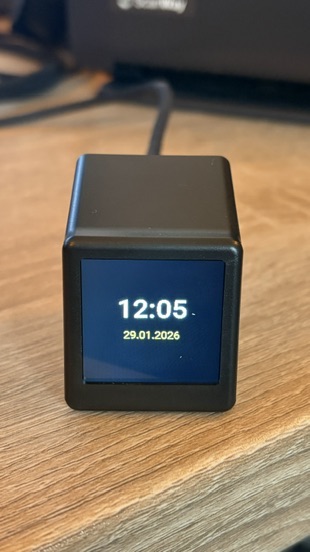
Falls hier jemand landet, der sein Display mal schnell testen möchte, hier ein ganz einfacher Code für eine Uhr mit Datum.
esphome:
  name: espminidisplay1
  friendly_name: ESP MiniDisplay 1

esp8266:
  board: d1_mini

wifi:
  ssid: !secret wifi_ssid
  password: !secret wifi_password

#enable HA API
api:

ota:
  - platform: esphome

#enable logger
logger:

spi:
  clk_pin: GPIO14
  mosi_pin: GPIO13
  id: spihwd

output:
  - platform: esp8266_pwm
    pin: GPIO05
    id: backlight_pwm
    inverted: true

light:
  - platform: monochromatic
    output: backlight_pwm
    name: "Backlight"
    restore_mode: RESTORE_AND_ON

time:
  - platform: homeassistant
    id: ha_time

font:
  - file:
      type: gfonts
      family: Roboto
      weight: 500
    id: font_time
    size: 48
    glyphs: "0123456789:"

  - file:
      type: gfonts
      family: Roboto
      weight: 400
    id: font_date
    size: 20
    glyphs: "0123456789.- "

display:
  - platform: mipi_spi
    model: st7789v
    spi_id: spihwd
    dc_pin: GPIO00
    reset_pin: GPIO02
    color_depth: 8
    invert_colors: true
    spi_mode: mode3
    dimensions:
      width: 240
      height: 240
    update_interval: 5s
    lambda: |-
      // Schwarzer Hintergrund
      it.fill(Color(0, 0, 0));

      auto now = id(ha_time).now();
      if (!now.is_valid()) {
        // Noch keine Zeit → einfach leerer Screen
        return;
      }

      // Uhrzeit HH:MM
      char time_str[6];
      snprintf(time_str, sizeof(time_str),
               "%02d:%02d", now.hour, now.minute);

      // Datum DD.MM.YYYY
      char date_str[11];
      snprintf(date_str, sizeof(date_str),
               "%02d.%02d.%04d",
               now.day_of_month, now.month, now.year);

      // Uhrzeit → weiß
      it.printf(120, 90, id(font_time),
                Color(255, 255, 255),
                TextAlign::CENTER, "%s", time_str);

      // Datum → gelb
      it.printf(120, 140, id(font_date),
                Color(255, 255, 0),
                TextAlign::CENTER, "%s", date_str);
2 „Gefällt mir“
Hallo zusammen,
ich habe die minimale yaml als Grundkonfiguration auf das Gerät gespielt und sehe in den logs auch, dass es geklappt hat. Ich würde aber nun gerne die originale .bin wieder auf den minitv spielen, scheitere aber daran, dass ich es nicht hinbekomme. Via USB und flash tool findet er den richtigen Port nicht und in ESPHome unter HA sehe ich keine Möglichkeit eine .bin hochzuladen.
Kann mirjmd einen Schubs in die richtige Richtung geben?
p.s.: das aktivieren des Webservers brachte mir ebenfalls keinen Upload-Button… =.o
Habe gerade auch mal geschaut, unter dem Web Installer von ESP Home
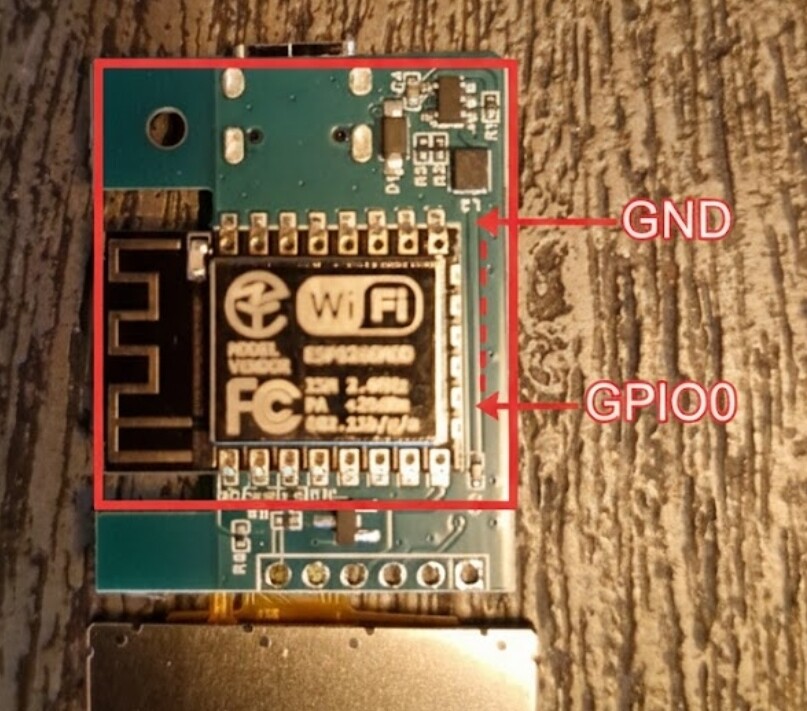
kann ich auch keine Verbindung zum Display herstellen. Ich vermute mal, dass man dann beim booten (verbinden zum PC) den Reset oder Boot Button drücken muss. Also das Gerät öffnen.
Das wäre jetzt auch mein erster Versuch: Reset oder Boot beim Einstecken gedrückt halten. Mit etwas Glück, klappt es dann hierüber.
Hast du es schon über das captive_portal von ESPHome versucht? Darüber sollte man doch ein OTA-Update machen können?
Vielen Dank für eure Antworten.
Ich hatte in der Zwischenzeit Zugriff auf den Webserver und konnte die originale Firmware aufspielen - leider ist das Gerät nun komplett tot?.
Scheinbar hat das Abspielen nicht geklappt, da der miniTV nun nicht mehr via Wlan verfügbar ist, in HA nicht mehr als online geführt wird und auch via USB nicht gefunden wird.
Einen Rest mittel GND+GPIO0 habe ich versucht, aber ohne Erfolg/ nicht korrekt durchgeführt?
Das Gerät ist leider mittlerweilenicht mehr in ESPhome verfügbat - Captative Portal ist also raus.
Ich denke ich habe irgendwie einen Softbrick im unbrickable ESP produziert ^^
Ist-Zustand: auf der Platine leuchtet ganz kurz eine blaue LED, sobald Spannung anliegt. Es ist aber keinerlei weitere Reaktion ersichtlich/ das Gerät nicht erreichbar.
Ich probiere nochmal in Ruhe weiter, wenn ich die Tage Zeit habe.
Besten Dank für eure Mühe!
Hallo Olli,
ich hatte Dein Video dazu aufmerksam verfolgt und wollte es auch probieren. Ich habe den MiniTV erfolgreich im Browser eingerichtet, damit ich sehe das er funktioniert. Erfolgreich.
Dann ESP-Home installiert und ein neues Gerät angelegt und mit deiner yaml-Datei importiert. Auch Erledigt.
Das ist Die Yaml Datei so wie sie ESP-Home anzeigt.
Soweit so gut. Gehe ich aber dann auf Update - Manueller Download passiert nichts ausser einem schwarzen Fenster wo kein Download angezeigt wird. Auch keine Fehlermeldung. Ich habe es dann mal auf dem Handy ausprobiert und folgenden Fehler erhalten:
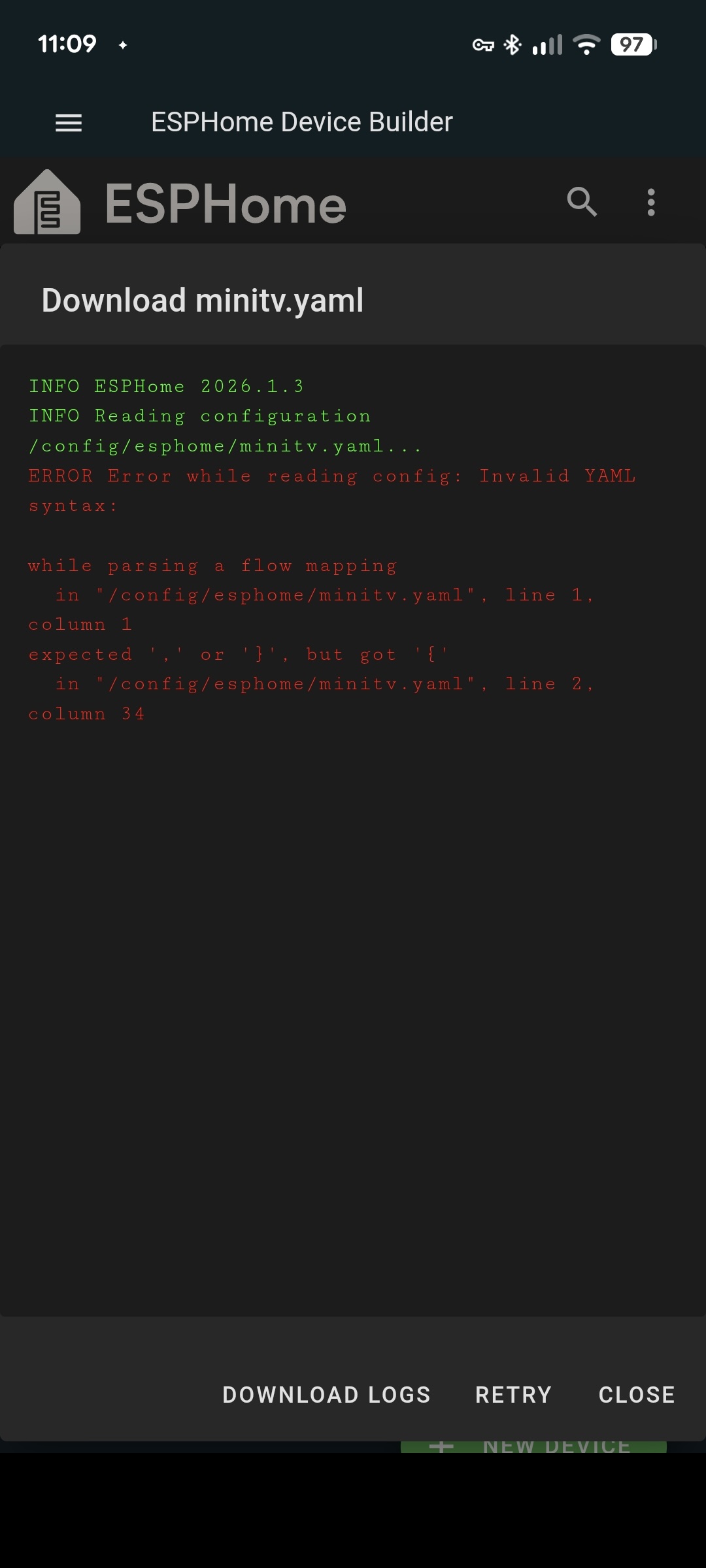
Ich komme nicht weiter. Habe das Gerät mehrmals in ESPHome entfernt und wieder neu hinzugefügt. Immer das selbe Ergebnis…
Hi @powercleaner !
Kannst du bitte mal deinen YAML-Code, der sich hinter minitv.yaml verbirgt hier teilen? Weil die Fehlermeldung besagt, dass da was mit der Syntax und/oder dem Inhalt nicht stimmt.
VG Olli
Hi Olli,
klar hier ist die Yaml-Datei
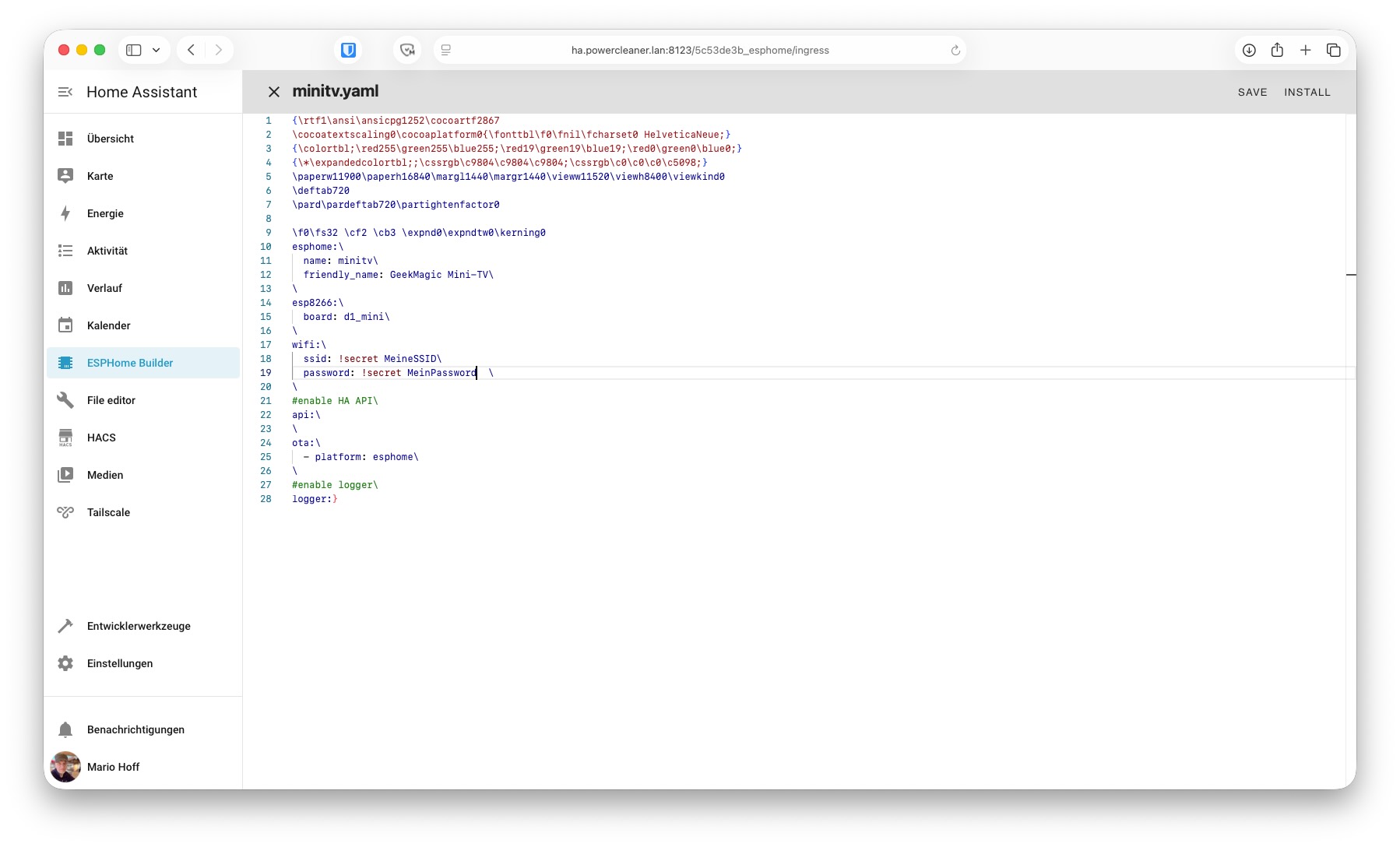
Ich habe Deine Yaml-Datei genommen. Den Code davor scheint ESPHome vorher selbst einzufügen…
Danke dir!
Da haben sich Dinge eingeschlichen, die da nicht hingehören.
In der minitv.yaml darf für einen ersten Wurf wirklich nur folgendes stehen:
esphome:
  name: minitv
  friendly_name: GeekMagic Mini-TV
esp8266:
  board: d1_mini
wifi:
  ssid: !secret wifi_ssid
  password: !secret wifi_password
#enable HA API
api:
ota:
  - platform: esphome
#enable logger
logger:
Dankeschön.
Ich setze das Geek nochmal zurück und probiere es noch einmal.
ich hatte folgende eintrage in meiner yaml-Datei:
esphome:
name: minitv
friendly_name: GeekMagic Mini-TV
esp8266:
board: d1_mini
wifi:
ssid: !secret SSID
password: !secret Password
#enable HA API
api:
ota:
- platform: esphome
#enable logger
logger:
Den Rest scheint wohl ESPHome zu machen. Ich probiere es aber noch mal.
Vielen Dank schon mal!
Hat leider nicht funktioniert, sehr seltsam das ist…
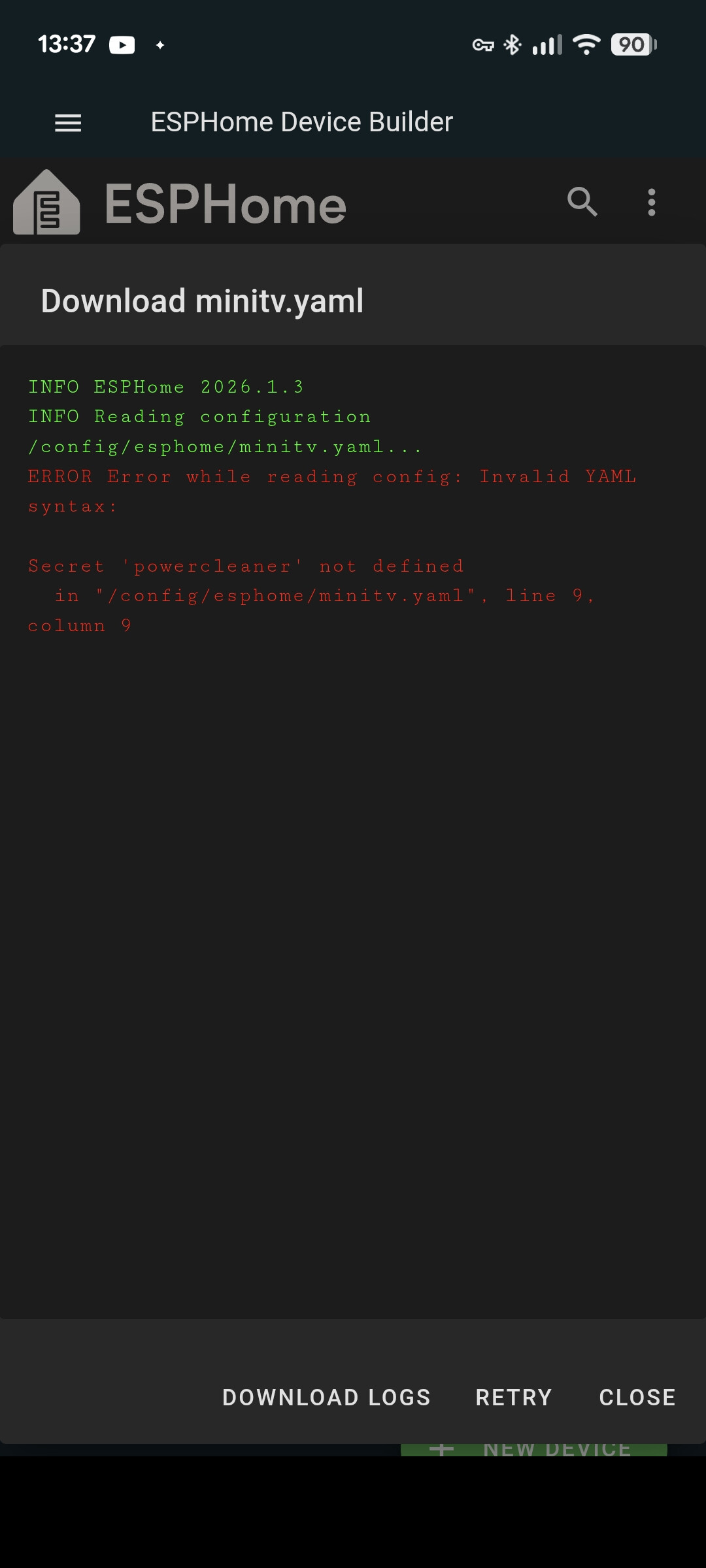
esphome:
name: minitv
friendly_name: GeekMagic Mini-TV
esp8266:
board: d1_mini
wifi:
ssid: !secret powercleaner
password: !secret MeinPassword
#enable HA API
api:
ota:
- platform: esphome
#enable logger
logger:
er ist ja definitiv mit dem WLAN powercleaner verbunden. Aber die Registerkarte zeigt nach der Installation immer Offline an obwohl der Import der yaml Datei erfolgreich war und ich Glückwünsche zum neuen Gerät bekomme…
Update:
seitdem ich aus der Yaml-Datei das “!secret” vor der SSID und dem Password weggelassen habe lies sich die .bin Datei erzeugen. Also alles erstmal im Grünen Bereich!
Danke für die Hilfe
1 „Gefällt mir“